How to Write the Html to a File in Vb.net
In this article I will explain with an example, how to create HTML File programmatically using C# and VB.Net.
First a Windows Form DataGridView will be populated with some data using DataTable and then an HTML Table will be generated using the values from the DataGridView.
Finally, the HTML Table in HTML string format will be saved to a Folder (Directory) as HTML File in Windows Forms (WinForms) Application using C# and VB.Net.
Form Design
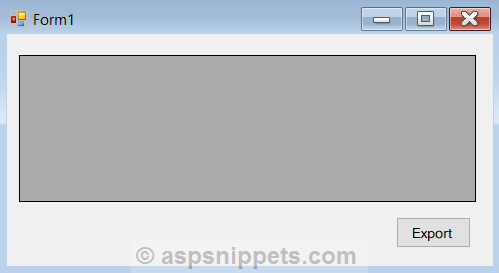
The Form consists of a DataGridView and a Button.
Namespaces
You will need to import the following namespace.
C#
VB.Net
Populating the DataGridView
Inside the Form Load event handler, the DataGridView is populated with data by making use of a dynamic DataTable with some records.
C#
private void Form1_Load(object sender, EventArgs e)
{
DataTable dt = new DataTable();
dt.Columns.AddRange(new DataColumn[3] { new DataColumn("Id", typeof(int)),
new DataColumn("Name", typeof(string)),
new DataColumn("Country",typeof(string)) });
dt.Rows.Add(1, "John Hammond", "United States");
dt.Rows.Add(2, "Mudassar Khan", "India");
dt.Rows.Add(3, "Suzanne Mathews", "France");
dt.Rows.Add(4, "Robert Schidner", "Russia");
this.dataGridView1.DataSource = dt;
this.dataGridView1.AllowUserToAddRows = false;
}
VB.Net
Private Sub Form1_Load(sender As System.Object, e As System.EventArgs) Handles MyBase.Load
Dim dt As New DataTable()
dt.Columns.AddRange(New DataColumn() {New DataColumn("Id", GetType(Integer)), _
New DataColumn("Name", GetType(String)), _
New DataColumn("Country", GetType(String))})
dt.Rows.Add(1, "John Hammond", "United States")
dt.Rows.Add(2, "Mudassar Khan", "India")
dt.Rows.Add(3, "Suzanne Mathews", "France")
dt.Rows.Add(4, "Robert Schidner", "Russia")
Me.dataGridView1.DataSource = dt
Me.dataGridView1.AllowUserToAddRows = False
End Sub
Creating HTML File programmatically using C# and VB.Net
When the Export Button is clicked, an HTML Table is created with string concatenation.
The HTML Table will contain columns same as that of the DataGridView and then a loop is executed over the DataGridView columns to add their header texts to the Header row of the HTML Table.
Once the Header row is populated then loop is executed over the DataGridView rows to add data rows to the HTML Table.
Finally, the HTML Table string will be saved to a Folder (Directory) in Windows Forms (WinForms) Application using C# and VB.Net.
C#
private void btnExport_Click(object sender, EventArgs e)
{
//Table start.
string html = "<table cellpadding='5' cellspacing='0' style='border: 1px solid #ccc;font-size: 9pt;font-family:arial'>";
//Adding HeaderRow.
html += "<tr>";
foreach (DataGridViewColumn column in dataGridView1.Columns)
{
html += "<th style='background-color: #B8DBFD;border: 1px solid #ccc'>" + column.HeaderText + "</th>";
}
html += "</tr>";
//Adding DataRow.
foreach (DataGridViewRow row in dataGridView1.Rows)
{
html += "<tr>";
foreach (DataGridViewCell cell in row.Cells)
{
html += "<td style='width:120px;border: 1px solid #ccc'>" + cell.Value.ToString() + "</td>";
}
html += "</tr>";
}
//Table end.
html += "</table>";
File.WriteAllText(@"E:\Files\DataGridView.htm", html);
}
VB.Net
Private Sub btnExport_Click(sender As System.Object, e As System.EventArgs) Handles btnExport.Click
'Table start.
Dim html As String = "<table cellpadding='5' cellspacing='0' style='border: 1px solid #ccc;font-size: 9pt;font-family:arial'>"
'Adding HeaderRow.
html &= "<tr>"
For Each column As DataGridViewColumn In dataGridView1.Columns
html &= "<th style='background-color: #B8DBFD;border: 1px solid #ccc'>" & column.HeaderText & "</th>"
Next
html &= "</tr>"
'Adding DataRow.
For Each row As DataGridViewRow In dataGridView1.Rows
html &= "<tr>"
For Each cell As DataGridViewCell In row.Cells
html &= "<td style='width:120px;border: 1px solid #ccc'>" & cell.Value.ToString() & "</td>"
Next
html &= "</tr>"
Next
'Table end.
html &= "</table>"
File.WriteAllText("E:\Files\DataGridView.htm", html)
End Sub
Screenshots
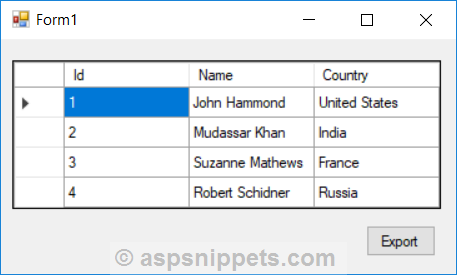
The DataGridView
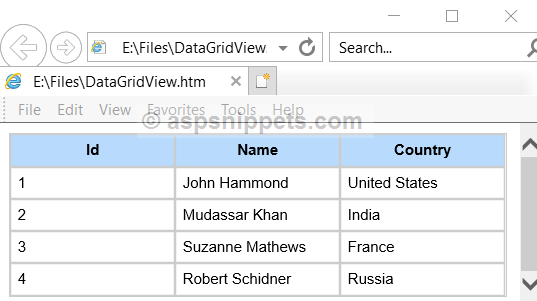
The exported HTML File
Downloads
How to Write the Html to a File in Vb.net
Source: https://www.aspsnippets.com/Articles/Create-HTML-File-programmatically-using-C-and-VBNet.aspx

Post a Comment for "How to Write the Html to a File in Vb.net"